

Creating a Trigger
Triggers are a tool that checks your ad campaign statistics at a user-defined frequency against user-defined conditions.
Conceptually, the way Triggers work can be described like this:
- They pull campaign statistics from the ad network
- They pull campaign statistics from the tracker
- They merge the data into one common structure
- They check the objects (campaigns / ads / sites) against the conditions you have set
- On a match, they perform the action you have set:
To create a Trigger:
- Click [Triggers] in the menu
- Click the [+ Add trigger] button
You will then see the following window:
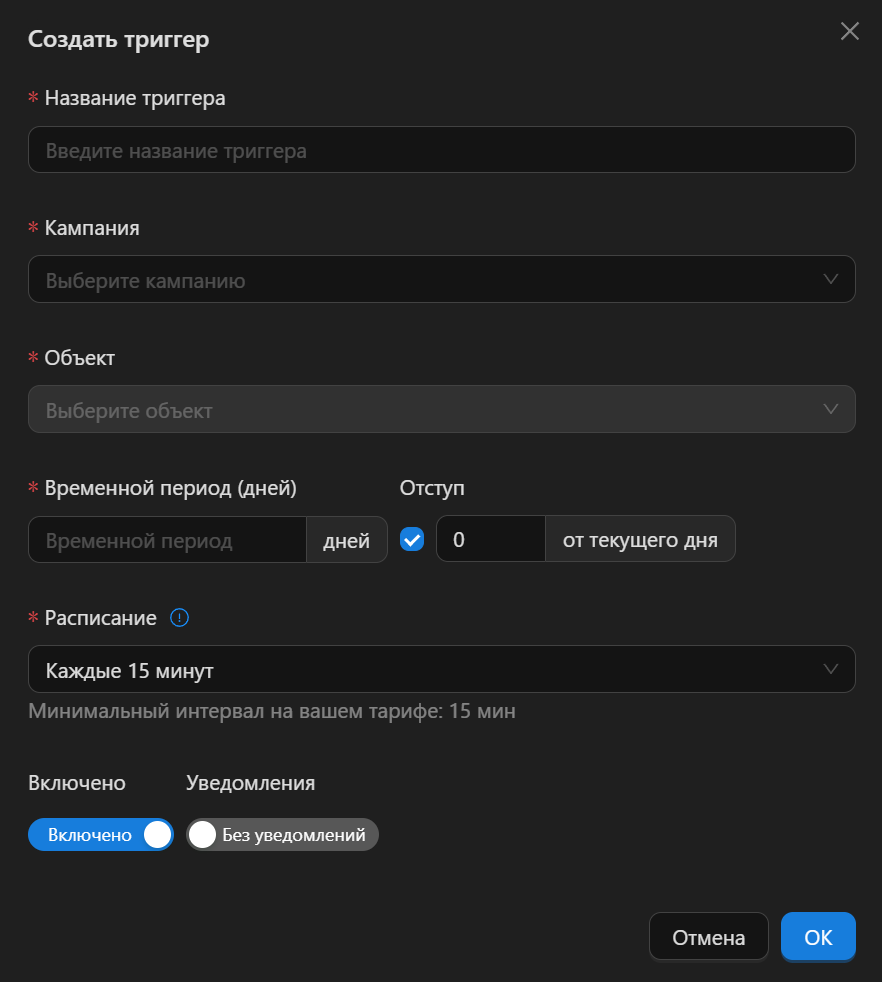
A quick overview of the fields in this window:
- Trigger name - any name you like. You will see it on the results page
- Campaign - here you need to select the campaign you created in the campaign creation step
- Object - here you need to select the object that the Triggers will analyze (campaign, ad, site)
- Time Period (days) - the number of days of statistics the Trigger will pull and analyze
- Offset - the number of days by which the statistics collection is shifted back from the current day (from "today", in other words)
- Schedule - the interval at which Triggers run. The more often a Trigger fires, the less of your budget bots/fraudsters/scammers/click-farmers (pick your favorite) will manage to burn through.
- Enabled - turns the Trigger on/off
- Notifications - turns the standard notifications on/off
Object
In CPA Pony, an Object is the entity that the system analyzes and performs actions on.
List of Objects:
- Campaign
- Ad
- Site
Some ad networks may also have additional Objects, for example:
- Campaign group
- Ad group
- and others
Each ad network has its own set of Objects. This is determined by the capabilities of the ad network's API. If the API allows exporting statistics broken down by one of the Objects listed above (besides the campaign), then we use it in the integration.
Time Period (days)
Over what period, in days, should Triggers check the statistics? That is exactly what you specify in this field.
INFO
Unfortunately, you can't set it to 9999 days, since every ad network has its own quirks and nuances. Some ad networks store statistics for 20 days, while others store statistics for years but only return the last six months via the API.
Besides, old statistics are not always valid today (this is especially true for sites).
The maximum allowed value is individual for each ad network.
Offset
Some ad networks fill in their statistics with a delay, and often quite a significant one. As a rule, this problem hits "today's" and "yesterday's" data the hardest.
Such incomplete statistics can negatively affect the accuracy of Trigger firing. This is exactly where the Offset option comes in, helping you bring false Trigger firings down to zero (the original technical term is "offset").
The Offset lets you shift the statistics collection back a few days from "today". It's easier to understand with examples. With an Offset of:
- 0 - standard behavior, statistics are collected up to and including today
- 1 - statistics are collected up to yesterday
- 2 - statistics are collected up to the day before yesterday
Schedule
This parameter is called a Schedule for ease of understanding; in reality, these are the intervals at which Triggers run.
INFO
Why is there no every minute interval?
Every request to an ad network is a heavy request, during which the ad network aggregates statistics by Object and period.
15 minutes is the minimum sensible interval for operation; anything below that starts to look like DDoSing the ad network.
However. If you need one-minute intervals and the ad network won't crash with a 500 error, won't block your API token or our server, then write to us at support@cpapony.com